Emoji Alchemy is a free browser game that connects an idle coin economy with a discovery puzzle. Click the orb, draw basic elements, combine two emojis, and use each discovery to develop your kingdom. You can play on desktop or mobile without installing anything or creating an account.
The orb, emoji draw, and production facilities in the live game.
Make your first discovery
Click the alchemy orb to earn your first coins. The first emoji draw costs 10 coins.
Your first four draws give you fire, water, earth, and wind in that order.
After the second draw, choose 🔥 fire and 💧 water in the combination screen. Their first result is ♨️ steam.
Open the discovery book to see the permanent effect of the new element. The result can also become an ingredient in another recipe.
A successful combination consumes one of each selected ingredient. A recipe using the same emoji twice needs two copies. Failed combinations do not consume ingredients; the game records the attempted pair so you can try something different next time.
For your next experiments, 🌍 earth + 💧 water makes 🌱 sprout, and 💨 wind + 💧 water makes ☁️ cloud. If you spent your only water on steam, draw another before trying those recipes.
Balance drawing with production
Early coins can buy more ingredients or your first automatic finger. The automatic finger earns coins while you attend to combinations; later facilities increase production further. Since a facility's price rises after each purchase, compare its current cost with the production it adds rather than always buying the most expensive item.
Owning 10, 25, or 50 copies of one facility unlocks larger production multipliers for that facility. A nearby quantity milestone can be more useful than a new building with a slower payoff. The production screen shows each facility's contribution and its progress toward the next milestone.
New discoveries can improve clicking, production, or both. Repeated copies of an emoji also build mastery. This means a familiar ingredient may still be useful after its first recipe.
Use the farm and sales deliberately
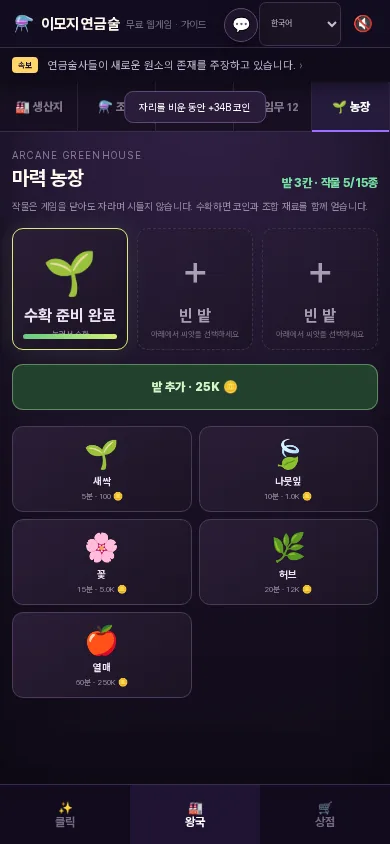
The farm unlocks after 20 distinct discoveries or after you build a magic greenhouse. You start with three plots. Planting consumes one crop emoji and its coin cost; harvesting returns coins and more copies of that crop. For example, a sprout takes five minutes to grow and returns two sprouts when harvested.
You can sell crafted items for coins, but selling consumes the item. Before selling your last copy, check whether you want to use it as an ingredient in another combination. This creates a choice between short-term income and your next discovery.
Actual mobile farm screen in Emoji Alchemy.
Keep your progress
The game saves progress in your browser and on the ROOT GAMES server for that browser. It also offers a JSON backup in the save menu. Export a backup before clearing browser data or moving to another device, then import the file on the new device. There is no account-based cross-device sync.
Owned facilities continue to generate offline coins for up to 12 hours at 60% of their base production rate. The game applies the offline reward when you return.
Quick answers
Is Emoji Alchemy free?
Yes. It is free to play in a web browser, with no installation or account required. Game coins have no cash value.
Do failed combinations waste ingredients?
No. Only a successful recipe consumes its ingredients. An unsuccessful pair is recorded for reference.
Can I continue on another device?
Yes, by exporting a JSON backup from the save menu and importing it on the other device. Progress does not sync through an account.
Where can I find more detailed strategies?
The strategy guide covers draw order, facility choices, farming, and selling in greater detail. It is currently published in Korean and can be translated using the page's language selector.
Play and learn more
Published by ROOT GAMES. Gameplay details reviewed on ; prices, rewards, and balance may change with updates. Check the game screen for current values.